Meet Bugaboo: The Color Font That Brings Instant Personality to Your Projects
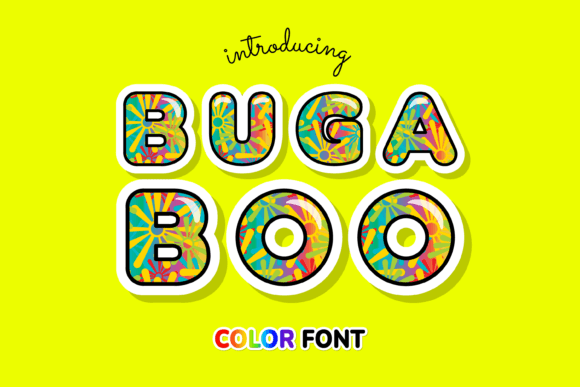
There's a specific kind of frustration that comes with finding the perfect visual concept for a project, only to realize your font options fall flat. You need something with energy, something that feels alive without hours of manual coloring or layering. Enter Bugaboo, a color font that doesn't just sit on the page—it practically bounces off it. This isn't your standard single-tone typeface. Built on the OpenType-SVG format, Bugaboo arrives with vibrant, pre-rendered color and texture baked directly into each character, giving you that hand-painted, multi-dimensional look the moment you type.
For designers, entrepreneurs, and creators, this changes the game. Instead of treating typography as a neutral container for words, Bugaboo makes the letterforms themselves a central part of the visual story. The playful, rounded shapes combined with its built-in color gradients create a style that's immediately engaging and memorable. It's the kind of font that can define a brand's personality or make a social media graphic stop the endless scroll.
Where Playful Typography Meets Practical Design
Let's get specific about where a font like this shines. Its inherent fun and approachability make it a natural fit for projects targeting families, children, or anyone seeking a joyful, energetic vibe. Think birthday party invitations, children's book covers, or branding for a kids' clothing line. But its utility stretches far beyond that niche. The bold, colorful nature of Bugaboo can inject personality into otherwise corporate spaces—a tech startup wanting to seem more friendly, a wellness brand emphasizing vibrant health, or a food blogger looking to make recipe titles pop.
Consider your packaging design. On a crowded shelf, a product using Bugaboo for its name or tagline immediately communicates creativity and confidence. It suggests the product inside is just as fun and carefully crafted as its exterior. For digital creators, this font is a secret weapon for creating eye-catching YouTube thumbnails, Instagram story templates, or podcast cover art that stands out in a feed. The key is using it strategically, as a highlight rather than a wall of text. Its best role is often as a display font for headlines, logos, or short, impactful phrases where its detailed color and texture can be fully appreciated.
Pairing Bugaboo with Other Typefaces for Maximum Impact
A common question with a strong personality font like Bugaboo is: what do I pair it with? The goal is balance, not competition. Because Bugaboo is detailed and colorful, it benefits from being anchored by a cleaner, more neutral companion font. This creates visual hierarchy and ensures readability.
For body copy or supporting text, consider pairing it with a classic sans serif font like Helvetica, Futura, or Open Sans. These provide a calm, readable counterpart that lets Bugaboo's headlines do the talking. If you're going for a more modern or slightly editorial feel, a simple serif like Lora or a clean slab serif could work beautifully. The principle is contrast in style and complexity. You might use Bugaboo for a main headline, a simple sans serif for subheadings, and a highly readable serif for paragraphs. Always test your pairings in context. See how they look together on a mockup of your website header, your business card, or your product label before committing.
Practical Considerations for a Smooth Workflow
Before diving in, it's crucial to understand the technical setup. Bugaboo is an OpenType-SVG color font. This means it's a premium font asset designed for specific software that supports this advanced format. You'll have the best experience using it in Adobe Photoshop, Adobe Illustrator, the free vector editor Inkscape, or design software like Silhouette Studio. This compatibility allows the font's intricate color details to render perfectly.
A critical note for crafters: This format is not compatible with Cricut Design Space. If you use a Cricut machine for cutting vinyl, paper, or other materials, this font will not work for your projects. Always verify software compatibility for any design asset you purchase to avoid workflow interruptions. For those using compatible programs, the process is seamless—install the font, select it from your type menu, and start creating. No extra steps are needed to achieve its signature colorful effect.
From Brand Identity to Marketing Assets: A Versatile Player
Think of Bugaboo as a versatile design asset in your toolkit, ready for numerous applications. In branding, it can become the cornerstone of a logo for a business that wants to project approachability and creativity. Used consistently across your brand identity—from your website to your email headers—it builds recognition through its unique visual signature.
For marketing, it's incredibly effective. Create a series of social media graphics with consistent Bugaboo-powered headlines to build a cohesive campaign look. Design promotional posters or flyers for events where you need to grab attention quickly. It even works for digital products like downloadable planners, educational worksheets, or e-book covers, adding a professional yet fun touch that increases perceived value. The key is to use it consistently for specific types of content to strengthen your visual communication.
Ultimately, choosing a font is a design decision that impacts how your message is received. Bugaboo offers a way to inject instant personality, energy, and professionalism into your work. It solves the problem of bland text by making the typography itself a feature. Whether you're finalizing a brand refresh, launching a new product line, or creating your next batch of content, consider if a touch of playful, colorful typography is what your project needs to connect and stand out.